Skin smoothing app, pores kept
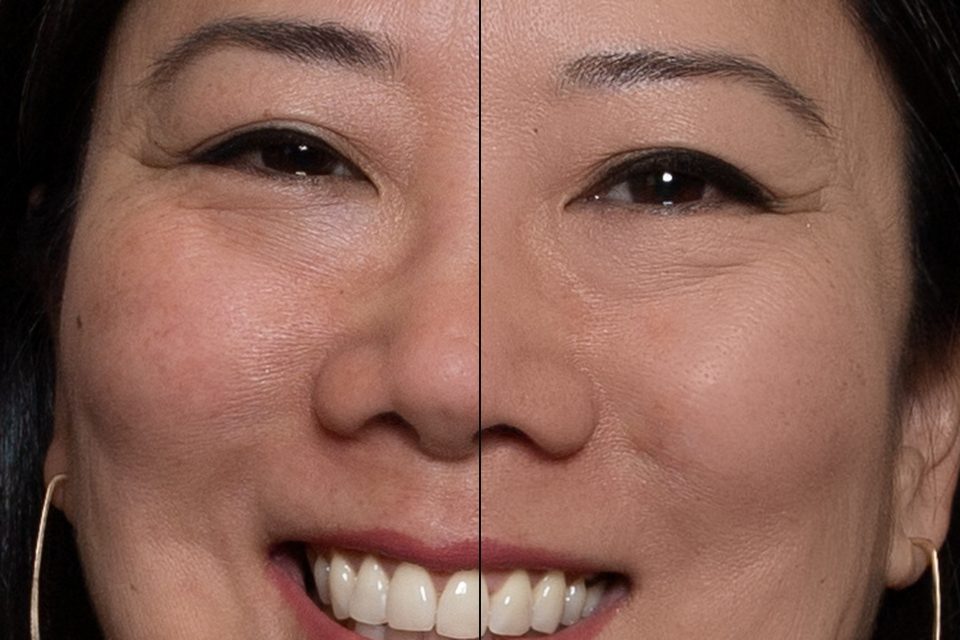
Small unevenness and blotchy colour are softened while pores, fine hair and grain stay sharp, so skin looks rested, not plastic. Red patches are evened towards the person’s own skin tone, with an option to keep a natural blush on the cheeks.
or drop files or a folder here, or paste
How to use it
- Choose portraits, a whole shoot, or drop them on the page.
- Pick a look or move the sliders; zoom in to check the skin at full detail.
- Save one photo or the whole batch as a ZIP, at full resolution.
Questions
How is this different from a blur filter?
A blur wipes out pores and makes skin look like plastic. Here the photo is split into fine detail and larger patterns of light and colour: only the larger patterns are evened out, so pores, fine hair and grain stay as shot. Even tone treats redness and the skin’s brown pigment separately, so red patches calm down while freckles, make-up and the skin’s own colour stay. Beards are found and smoothed far less.
Does it make skin look plastic?
No. The finest detail of the photo (pores, fine hair, grain) is never blurred: smoothing and toning only change the larger patterns of light and colour, and spots are healed with nearby real skin texture. The Texture slider can add or soften detail by hand.
Does it work on group photos?
Yes. Every face is found separately, also small faces in wide group shots, and you can change the sliders for one person or skip a face.
Can I retouch a whole shoot at once?
Yes. Drop a folder: the same settings are adapted to each face of each photo, and you save everything as one ZIP. Fine-tune any single photo, its own spots and faces stay with it.
Which AI models does it use?
Small open models that run in your browser: YuNet to find faces, Google MediaPipe face landmarks (478 points per face) and MediaPipe selfie segmentation for skin and hair. They download once (about 25 MB) and then work offline.
Are my photos uploaded anywhere?
No. FotoJock runs entirely in your browser: the files are read, converted and saved on your own phone or computer. Nothing is sent to a server, and it keeps working offline once the page is open.
Is it really free?
Yes, with no account, no watermark and no limit on the number of files. FotoJock is made by Foto Jocković, a photo shop in Belgrade.
All tools
Mini-apps
Free photo toys by Foto Jocković, each on its own page.
 VHS CameraVideo and photos with a real camcorder look
 Photo PuzzlePlay it, print it or laser-cut it
 On Your WallPreview a framed print on your wall
 Sticker MakerDie-cut stickers and sticker sheets
 Lithophane MakerA 3D-printable photo light box
 Star Map PosterThe night sky of your date and place
 City Map PosterThe streets of your place, as a print
 Film LabPick a film stock and shoot a 35 mm roll